PROVE by JGS

When someone asks “prove it”
hand them this.

We collect objective Microsoft 365 configuration evidence, evaluate 140 controls against the CIS Microsoft 365 Foundations Benchmark v6.0.1, and package the results into an offline evidence bundle with a reviewer-ready binder and technical evidence pack. Portable. Ready to hand to an insurer, auditor, client reviewer, or due diligence team.

Evidence-as-a-product Reviewer-ready evidence Offline package. No account Offline & portable
Without PROVE
📧Re: MFA evidence?Can you resend that screenshot?
📁Screenshots (3)MFA_proof_v2_FINAL_revised.png
📄Vendor Questionnaire.xlsx“Describe your email security”
💬#compliance“Anyone have the CA export?”
Renewal in 18 daysUnderwriter still waiting
With PROVE
📦PROVE_CLIENT_BUNDLE_Contoso.zipExtract once. Open START_HERE.html.
PROVE_CLIENT_BUNDLE_Contoso/
 ▶ START_HERE.html
 📁 PROVE_BINDER_Contoso/
  📄 index.html
  📄 binder_payload.json
 📁 PROVE_EVIDENCE_PACK_Contoso/
  📄 run_scorecard.md
  📄 evidence_worklist.csv
  🔒 CHECKSUMS.sha256
  🔒 chain_of_custody.md
  🔒 PROVE_GATE_REPORT.md
The problem
Three conversations. Zero good answers.
INSURANCE RENEWAL

“Show us your MFA and email security posture.”

Your insurer sends a questionnaire. You spend a week pulling screenshots, writing narratives, and hoping it’s enough. PROVE turns that scramble into a single CIS-aligned evidence package.

CLIENT DUE DILIGENCE

“Can you demonstrate your security controls?”

A prospect or existing client asks for proof. You rewrite the same answers for every questionnaire—and nobody can independently verify any of it.

MSP TRANSITION

“What’s the current state of our tenant?”

You’re switching IT providers, or you just hired one. Someone should look at what’s there—and that someone shouldn’t be the one grading their own work.

PROVE replaces the scramble.

Instead of pulling screenshots and writing cover letters, you hand the reviewer a single evidence binder that shows what’s configured, what passed, what didn’t, and what still needs a human answer. Built from collected configuration evidence. Deterministic: same evidence in, same outcomes out. A reviewer can check it for themselves.

140

CIS controls evaluated

9

CIS benchmark sections

1

Offline evidence bundle

0

Changes to your tenant

What lands on your desk
One clean ZIP. Offline. Client-owned.

Extract once, then open START_HERE.html to launch the offline binder.

  • Evidence Binder

    The thing your reviewer reads. Every control includes an Audit Narrative: the requirement, what was tested, what was found, and how to fix it. Opens offline in any browser.

  • Follow-up Worklists

    Anything that needs human follow-up, like a policy document, a signed statement, or a manual export, gets its own checklist entry with exactly what to provide.

  • Evidence Pack

    The supporting files behind the binder: tenant exports, trace files, and delivery records. A reviewer can trace any outcome back to the source evidence.

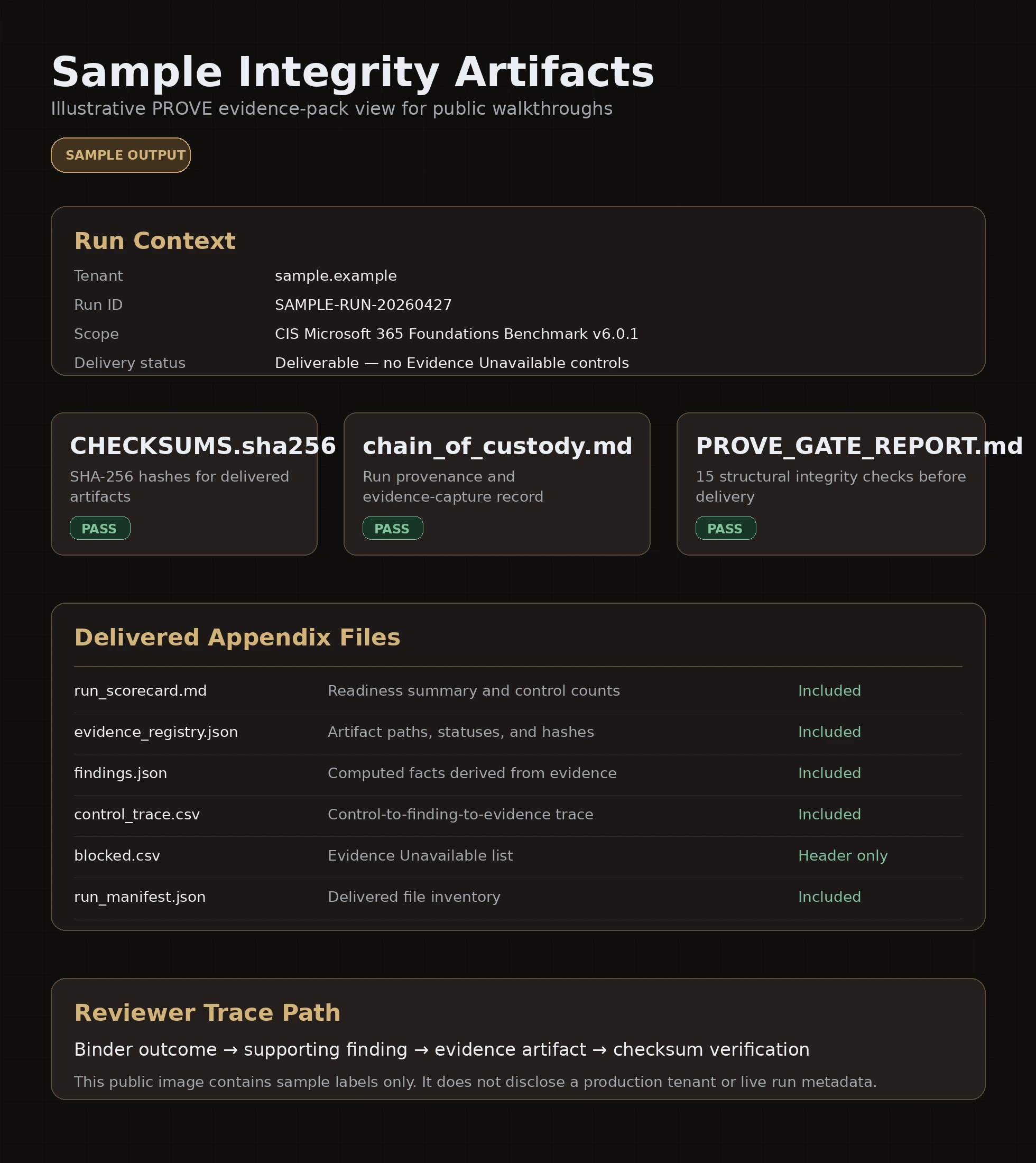
  • Integrity Artifacts

    SHA-256 checksums, chain of custody, and a gate report showing that 15 integrity checks passed before delivery. The package ships only when there are zero Evidence Unavailable controls. Evidence Required and Attestation Required remain valid worklist outcomes.

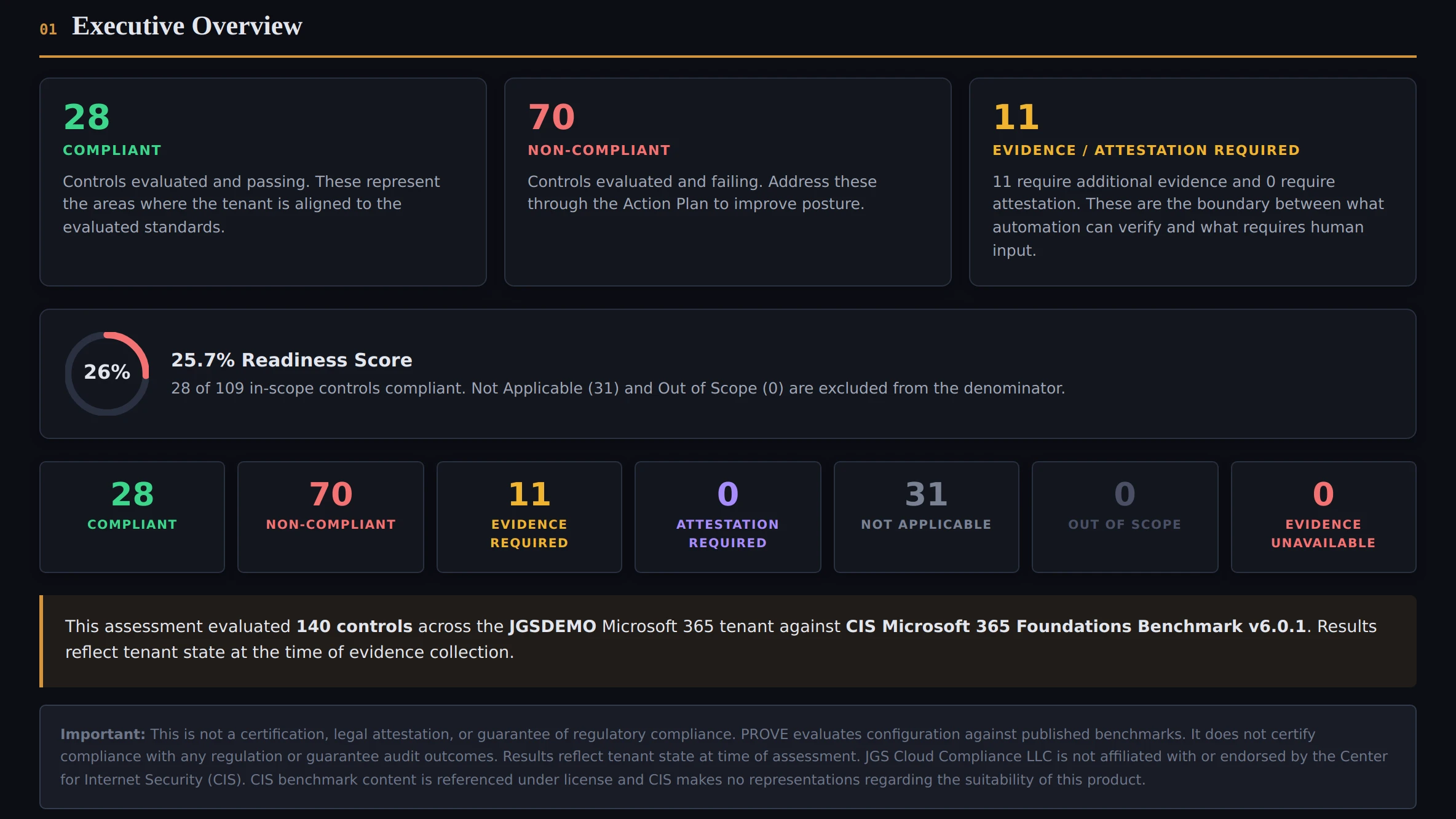
PROVE Assessment Binder Executive Summary showing 140 CIS controls, readiness score, outcome breakdown, and delivery status
Executive Summary — sample output from the CIS-only client binder SAMPLE OUTPUT
How it works
Five steps. Read-only collection. No tenant changes.

If a control cannot be evaluated safely and would become Evidence Unavailable, delivery stops until the issue is resolved. We do not guess.

1

Scope

Agree what we’re checking and what we’re not.

2

Collect

Read-only collection of your Microsoft 365 configuration.

3

Evaluate

Findings tested against the CIS Microsoft 365 Foundations Benchmark v6.0.1.

4

Package

Binder, worklists, evidence pack, and integrity artifacts.

5

Deliver

You get one ZIP. Follow-up items get a worklist.

Inside the binder
This is what your reviewer actually opens.

Sample output from a PROVE assessment walkthrough. Click to explore each section.

Section Overview
Control Register
Control Detail
Action Plan
Closure Requests
Compliance Readiness
Scope & Methodology
Integrity Artifacts
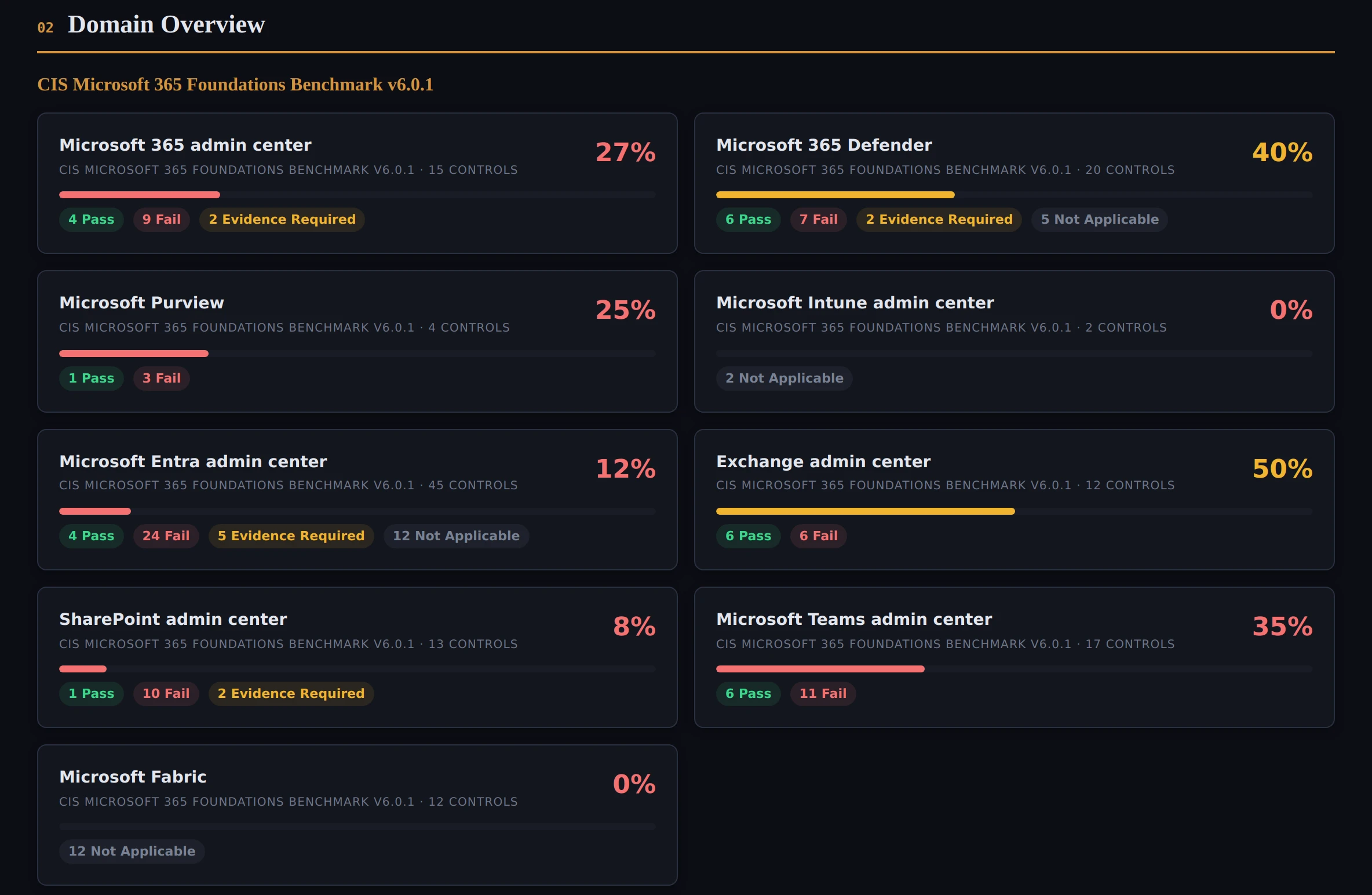
Section Overview showing 9 CIS benchmark sections with pass-rate bars and control counts

Section Overview

Nine CIS benchmark sections with pass rates, control counts, and inline previews.

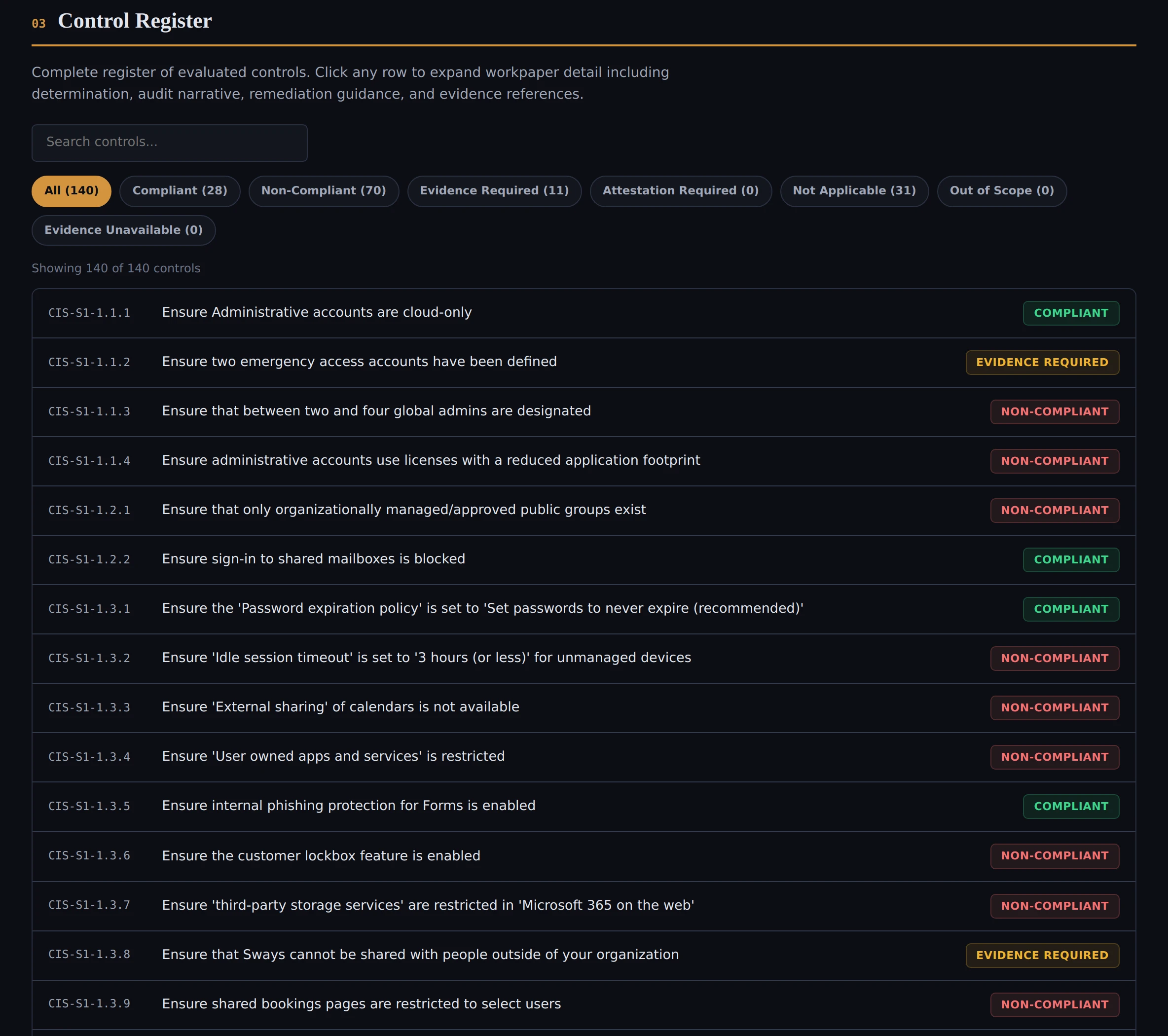
Control Register showing 140 CIS controls with outcome filters and searchable control list

Control Register

All 140 CIS controls in one searchable register. Filter by outcome or keyword. Click any row to expand the full workpaper detail.

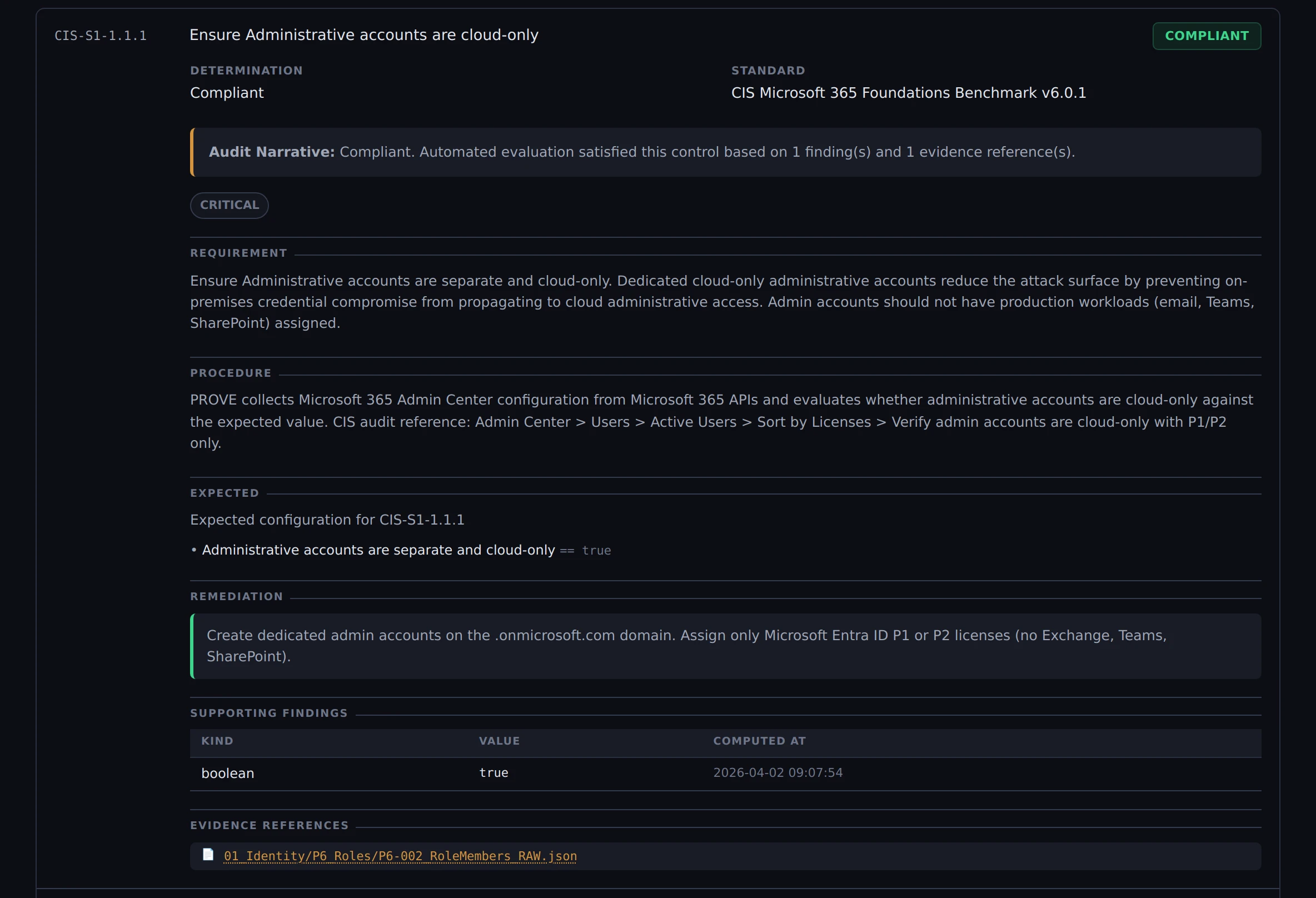
Expanded control showing Audit Narrative, requirement, procedure, expected result, remediation, findings, and evidence references

Control Detail

Expand any control to see the full workpaper: Audit Narrative, the standard’s requirement, what was tested, the expected result, remediation guidance, findings with values, and links to the source evidence.

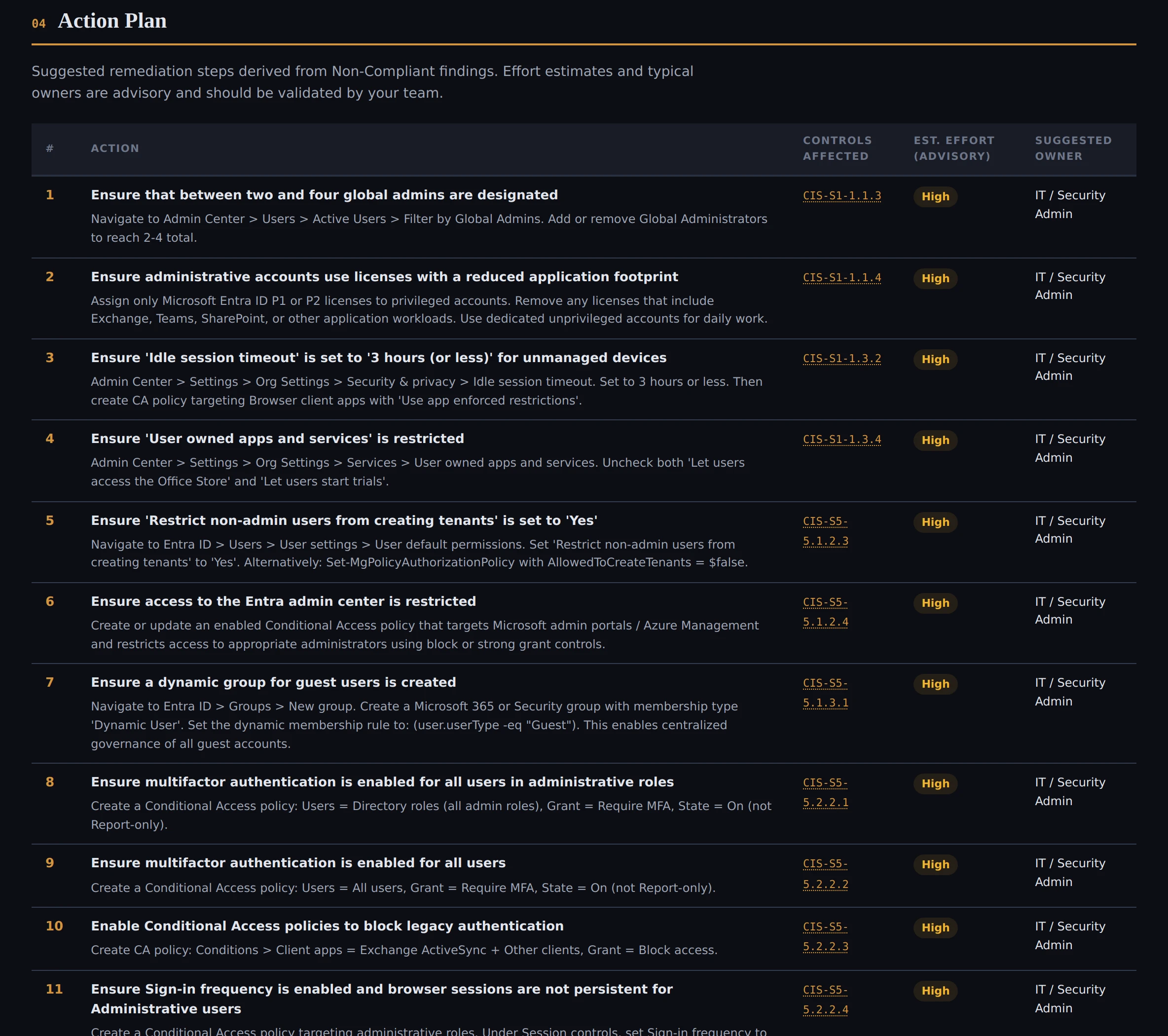
Action Plan with prioritized remediation steps including admin-center paths and effort estimates

Action Plan

Every Non-Compliant control gets a specific remediation step: which admin center, which setting, what to change. Priority-ranked with practical next actions and suggested owners.

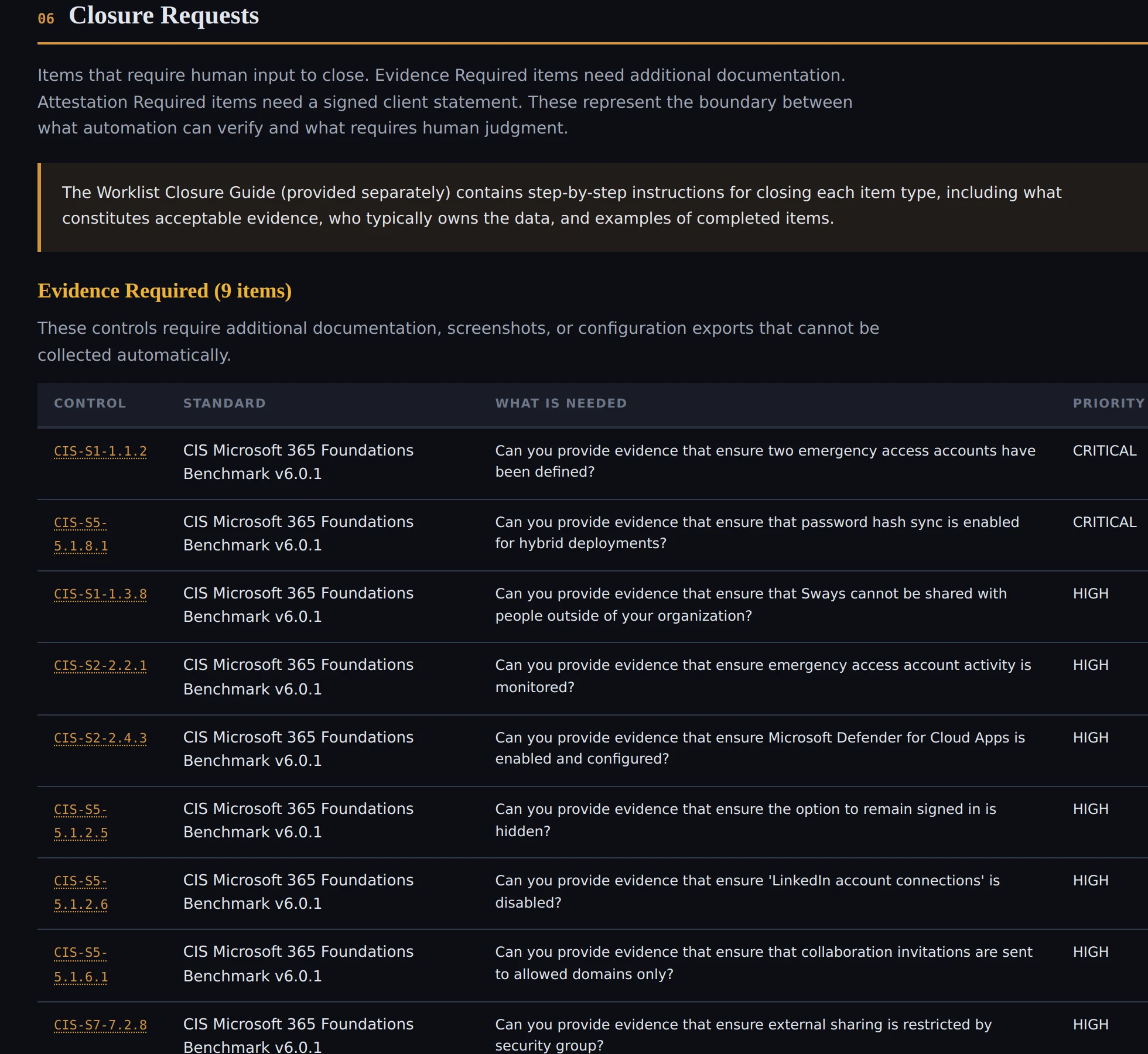
Closure Requests showing evidence and attestation follow-up items

Closure Requests

Controls that need a policy document, signed statement, screenshot, or manual export are separated into follow-up items. The delivered bundle remains a point-in-time record; supplemental evidence can sit alongside it as governance workpapers.

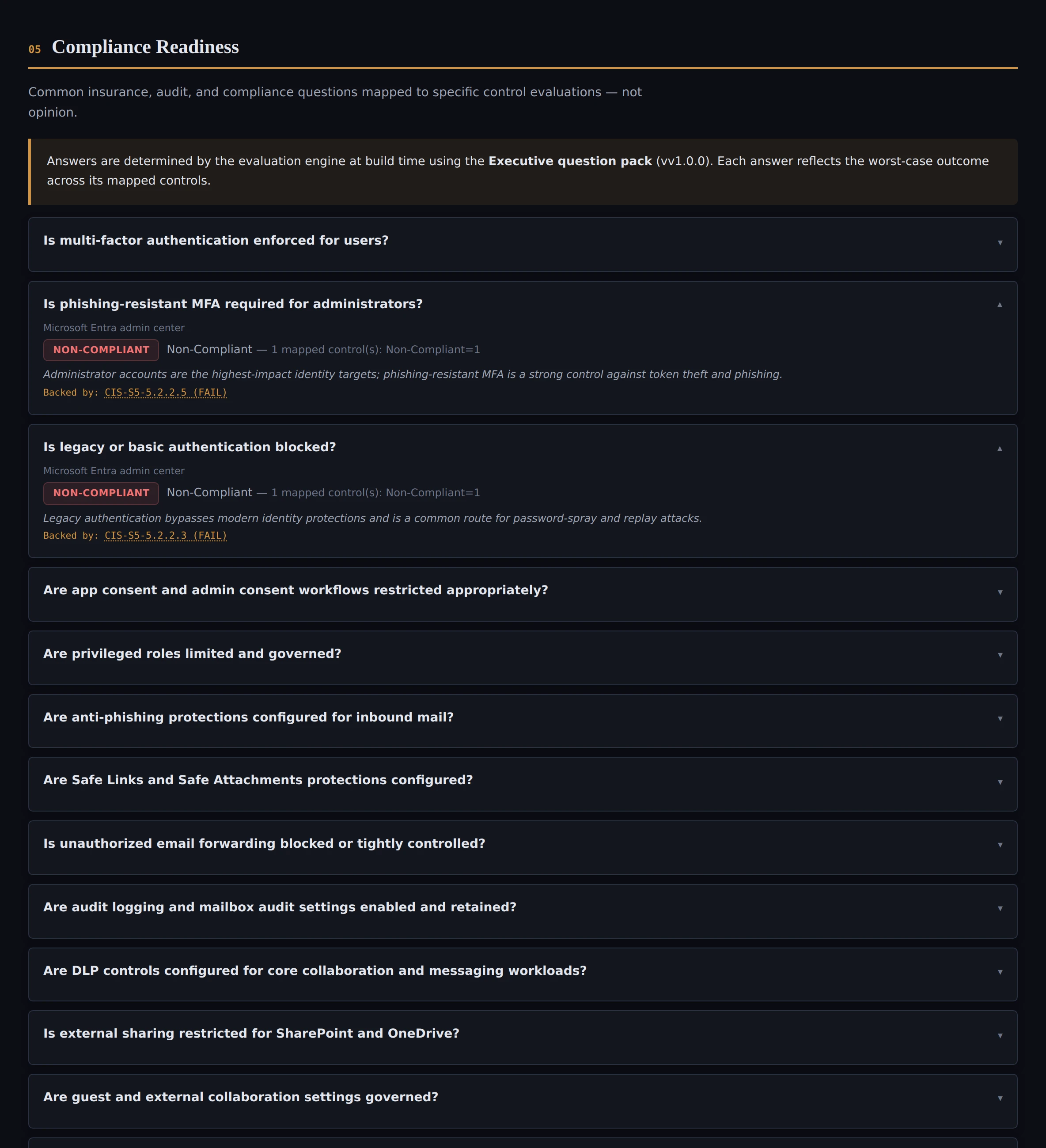
Compliance Readiness showing common insurance, audit, and compliance questions mapped to specific control evaluations

Compliance Readiness

Common insurance, audit, and compliance questions mapped to specific control evaluations — not opinion. Each answer reflects the worst-case outcome across its mapped controls.

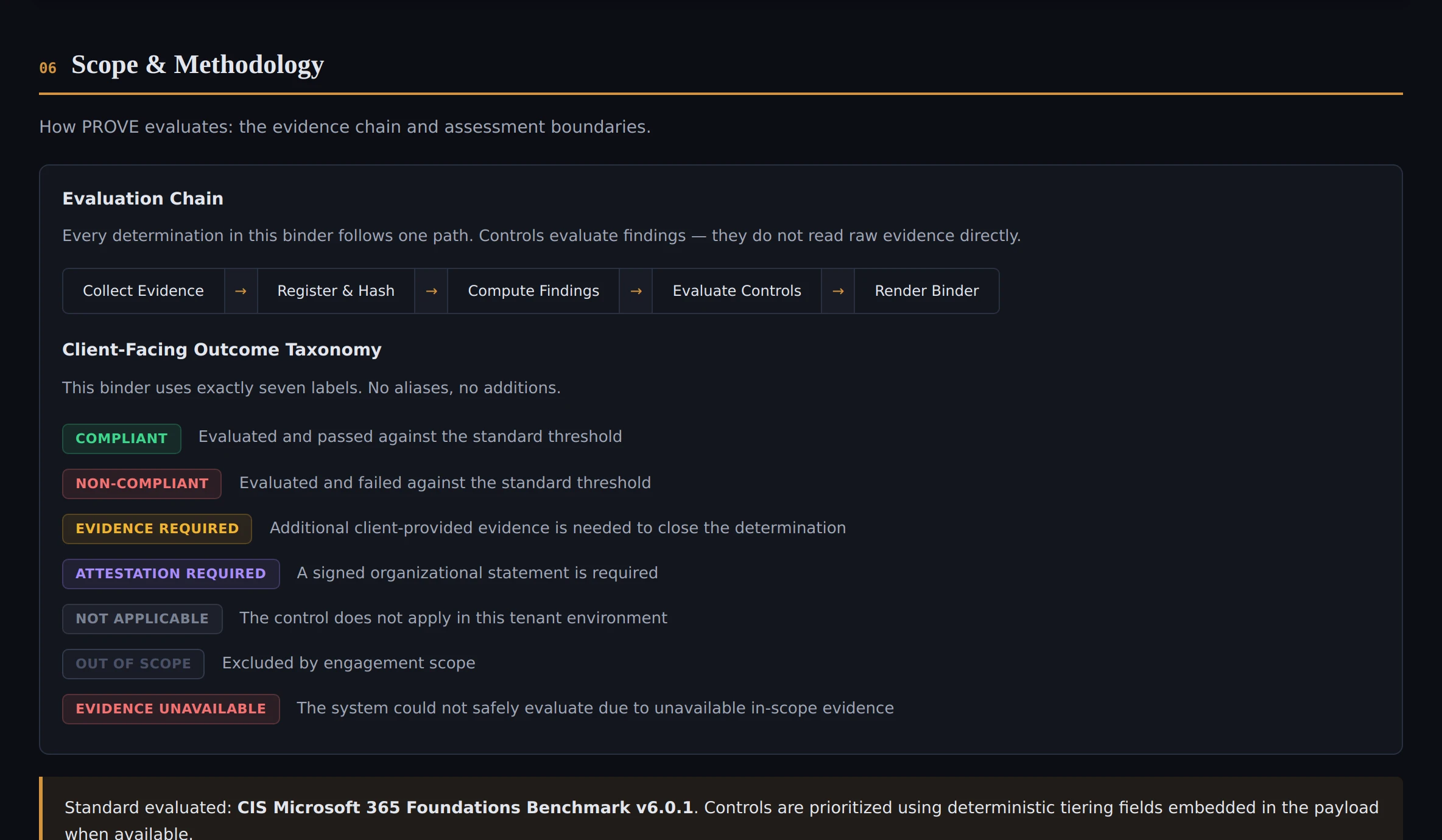
Scope and Methodology showing the evaluation chain and client-facing outcome taxonomy with seven labels

Scope & Methodology

Assessment boundary, methodology, and the seven outcome labels used in the binder.

Integrity Artifacts showing checksums, chain of custody, and gate report

Integrity Artifacts

Checksums, chain of custody, run records, and gate-report evidence show the bundle passed delivery integrity checks before it was allowed to ship.

Your data never leaves the engagement.

PROVE runs entirely on a JGS workstation. No tenant data is uploaded to any cloud service or third-party infrastructure. The assessment uses 35 scoped permissions total — 34 application permissions via certificate-based authentication, plus one delegated SharePoint scope for tenant-admin configuration reads. The implemented workflow performs read operations only. Microsoft-verified publisher.

Evidence is retained for a maximum of 30 days following delivery, then securely deleted. You can revoke all permissions at any time by removing the app from Entra ID. The evaluation engine uses deterministic rule-based logic with traceable outcomes.

Compliant

The control met the evaluated requirement.

Non-Compliant

The control did not meet the evaluated requirement.

Evidence Required

Human-supplied documentation or export is needed.

Attestation Required

A management statement is needed.

Not Applicable

The control does not apply to the assessed tenant state.

Out of Scope

The control was excluded by the declared scope.

Evidence Unavailable

Required in-scope evidence could not be collected.

Delivery Rule

Evidence Unavailable blocks delivery. Non-compliance does not.

Pricing
Fixed price. No hourly. No surprises.

Choose the option that fits your workflow.

Single Scan
One run. One bundle. A point-in-time evidence bundle for your Microsoft 365 tenant.
$1,495
One assessment run
  • Offline evidence bundle
  • Worklists with specific action items
  • Evidence pack with supporting files
  • Integrity artifacts (checksums + custody)
  • 140 CIS controls across 9 benchmark sections
PROVE delivers the evidence package. Any hands-on cleanup after review is scoped separately.

What PROVE is not.

Not a pen test. Not a vulnerability scan. Not a certification or legal opinion. Not a guarantee your insurer will say yes. Not hosted software, recurring monitoring, or a SaaS subscription. Not an MSP, a SOC, or a helpdesk. We show what’s there. If you want fixes, that’s a separate engagement.

FAQ
Common questions
What exactly do you look at?
PROVE evaluates 140 controls across 9 sections of the CIS Microsoft 365 Foundations Benchmark v6.0.1. The assessment focuses on Microsoft 365 configuration evidence that can be collected, evaluated, packaged, and reviewed.
What access do you need?
The app must be consented by a Privileged Role Administrator or Global Administrator. Full runs also require the approved run-window access method, Exchange RBAC assignment to the PROVE service principal, and Azure subscription access where applicable. The assessment uses 35 scoped permissions total: 34 application permissions via certificate-based authentication plus one delegated SharePoint scope for tenant-admin configuration reads. The implemented workflow performs read operations only.
Do you change anything in our Microsoft 365?
No. The implemented assessment workflow performs read operations only and makes no tenant changes. If you want changes afterward, that is a separate engagement with its own approved scope.
How long does it take?
Evidence collection takes hours, not weeks. Delivery timing depends mostly on scheduling, access readiness, and prerequisites. If a control would be labeled Evidence Unavailable, delivery stops until the issue is resolved.
We already use Secure Score / Defender reports. Why this?
Internal security tools help you monitor your tenant. PROVE produces evidence your auditor, insurer, or client reviewer can independently verify without logging into your tenant or relying on screenshots.
Is this a certification?
No. PROVE provides point-in-time evidence and governance determinations. It is not a certification, legal attestation, audit, or guarantee. Reviewers apply their own judgment.
What if some items need follow-up?
They go on a worklist. Some controls require a policy document, a signed statement, a screenshot, or a manual export. Each worklist entry tells you what to provide and what done looks like.
How are outcomes determined?
The evaluation engine is deterministic: rule-based logic applied to collected evidence. Same evidence in, same outcomes out.
How do we verify the results haven’t been tampered with?
The bundle includes SHA-256 checksums for evidence artifacts, a chain-of-custody record, and a gate report showing that 15 integrity checks passed before delivery was allowed.
What happens to our data after the engagement?
Evidence is retained for a maximum of 30 days following delivery, then securely deleted unless otherwise agreed in writing. No tenant data is uploaded to a JGS cloud service or third-party infrastructure.
Stop scrambling. Start handing it over.

Short call. We confirm fit, agree scope, and schedule the run.